服务器与客户端时区不一致导致的水合问题
技术
2025年12月6日
4分钟阅读
本文介绍了nextjs中服务器与客户端时区不一致导致的水合问题以及解决方案
nextjs问题记录
问题描述
页面发生报错
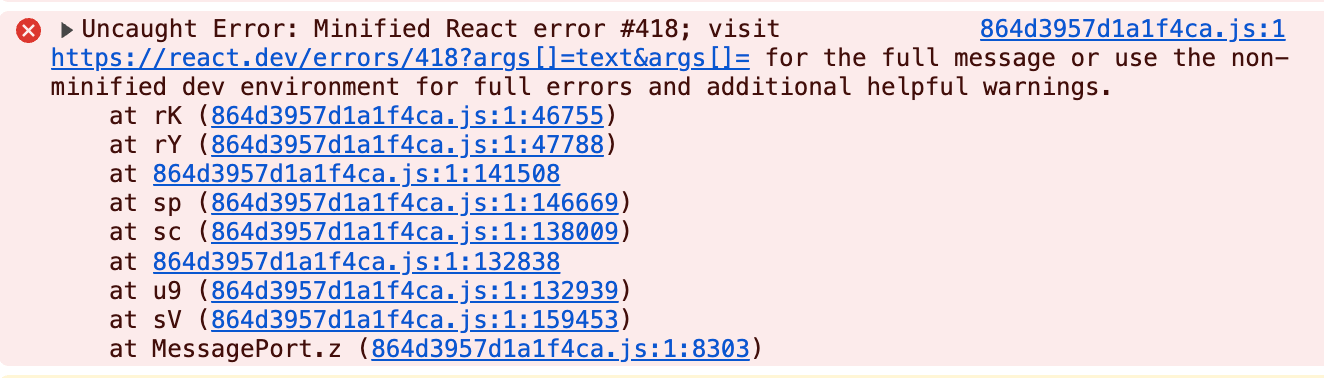
官方错误链接
问题代码:
一个展示文章创建时间的组件, date 格式为 yyyy-MM-dd HH:mm:ss
import { Calendar } from "lucide-react";
import { useFormatter } from "next-intl";
import { cn } from "@/lib/utils";

export default function PostDate({
  date,
  className,
}: {
  date: Date;
  className?: string;
}) {
  const format = useFormatter();

  if (!date) {
    return null;
  }
  return (
    <div
      className={cn("text-main-label flex items-center space-x-1", className)}
    >
      <Calendar />
      <span>
        {format.dateTime(new Date(date), {
          year: "numeric",
          month: "short",
          day: "numeric",
        })}
      </span>
    </div>
  );
}
format.dateTime 是国际化框架 next-intl 的格式化时间函数,主要作用是根据不同的地区展示不同的时间格式
e.g.
zh 地区展示 2025年12月4日
en 地区展示 Dec 4, 2025
问题原因
代码的服务器部署在西5区,访问代码的浏览器在东8区
代码中 new Date(date) 在服务端渲染时根据西5区的时区取得时间对象,在浏览器访问时根据东8区的时区取得时间对象
在通过 format.dateTime 方法取得年月日时,采用的是 UTC 时区,不同时区的时间对象返回的年月日不同,造成服务端的渲染结果与客户端的渲染结果不一致
🌰 举个例子
const time = '2025-11-15 10:00:00'

// 东8时区
// Sat Nov 15 2025 06:00:00 GMT+0800 (中国标准时间)
const east_time = new Date(time)
// 采用 UTC 计时,转换为 2025-11-14T22:00:00Z
// 获取年月日:2025-11-14
const east_date = format.dateTime(east_time)

// 西5时区
// Sat Nov 15 2025 06:00:00 GMT-0500 (纽约标准时间)
const west_date = new Date(date)
// 采用 UTC 计时,转换为 2025-11-15T11:00:00Z
// 获取年月日:2025-11-15
const west_date = format.dateTime(east_time)

// west_date !== east_date
解决方案
有两种解决方案,这里推荐第二种
简单方案
通过 useEffect 等前端hook强行让组件跳过服务端渲染,直接在前端渲染
'use client'

import { Calendar } from "lucide-react";
import { useFormatter } from "next-intl";
import { cn } from "@/lib/utils";

export default function PostDate({
  date,
  className,
}: {
  date: Date;
  className?: string;
}) {
  const format = useFormatter();
  const [dateFormat, setDateFormat] = useState(null)

  useEffect(() => {
	  setDateFormat(() => {
		  return format.dateTime(new Date(date), {
         year: "numeric",
         month: "short",
         day: "numeric",
       })
	  })
  },[date])

  if (!date) {
    return null;
  }

  return (
    <div
      className={cn("text-main-label flex items-center space-x-1", className)}
    >
      <Calendar />
      <span>
        {dateFormat}
      </span>
    </div>
  );
前端渲染容易造成闪烁问题,不推荐
带时区展示
问题的根本在于时区不同导致的展示区别,所以将时区固定就好了
首先保证传入的 date 携带时区,如 2025-11-15T10:00:00+08:00 或直接使用时间戳这样保证获取的时间对象是相同的绝对时间
然后在展示时传入时区参数,保证获取的时间一样
import { Calendar } from "lucide-react";
import { useFormatter, useTimeZone } from "next-intl";
import { cn } from "@/lib/utils";

export default function PostDate({
  date,
  className,
}: {
  date: string;
  className?: string;
}) {
  const format = useFormatter();
  const timeZone = useTimeZone();

  if (!date) {
    return null;
  }
  return (
    <div
      className={cn("text-main-label flex items-center space-x-1", className)}
    >
      <Calendar />
      <span>
        {format.dateTime(new Date(date), {
          year: "numeric",
          month: "short",
          day: "numeric",
          timeZone,
        })}
      </span>
    </div>
  );
}
我的项目中有使用国际化,所以直接根据当前的国家获取时区了,也就是 useTimeZone 方法
如果没有使用国际化,dayjs、moment 中都有根据时区获取格式化时间的方法,这里就不赘述